Amazon Ads in ChatGPT — MCP Connector Setup
Connect your Amazon Ads data to ChatGPT through an MCP Connector. Query campaigns, analyze keywords, check bids, and get optimization recommendations — all inside ChatGPT. Requires a Plus, Team, or Pro subscription.
Setup in 3 Steps
Open Plugins
In ChatGPT's left sidebar, click Plugins, then click the + on the right-hand side to open the New Plugin form.
Create the Plugin
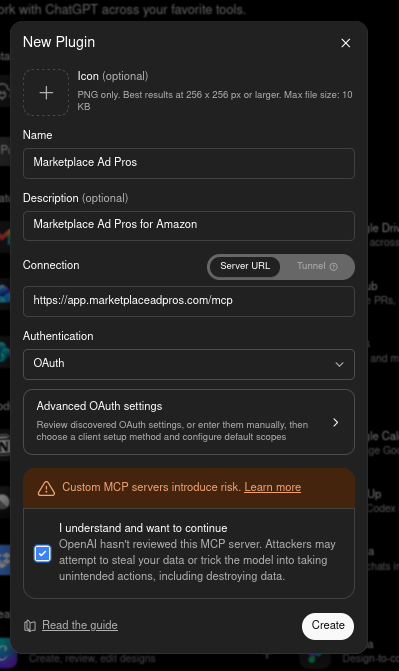
Enter the name, description, and Server URL below. Choose OAuth for authentication. Click Create to authorize.
Start Querying
Once authorized, your Amazon Ads data is available in ChatGPT. Ask questions about campaigns, keywords, bids, and performance.
Detailed Setup Instructions
Step 1: Open the New Plugin form
- In the left sidebar of ChatGPT, click Plugins.
- Click the + on the right-hand side.
Step 2: Create the Plugin
- For Name, enter:
Marketplace Ad Pros - For Description, enter:
Marketplace Ad Pros for Amazon - For Connection, keep Server URL selected and enter:
https://app.marketplaceadpros.com/mcp - For Authentication, select OAuth.
- Tick the box next to "I understand and want to continue".
- Click Create. You'll be redirected to Marketplace Ad Pros to log in and choose which permissions to grant, then sent back to ChatGPT.
Plugin Details
| Name | Marketplace Ad Pros |
| Description | Marketplace Ad Pros for Amazon |
| Server URL | https://app.marketplaceadpros.com/mcp |
| Authentication | OAuth |
What You Can Do
Campaign Analysis
Ask ChatGPT about spend, sales, ACOS, and ROAS across any campaign, ad group, or keyword.
Keyword Discovery
Find keyword opportunities, spot wasted spend, and get negative keyword suggestions from search term data.
Bid & Budget Recommendations
Get data-backed bid adjustments and budget allocation suggestions based on your actual performance.
Multi-Brand Management
Manage multiple brands from one connection. Switch between clients in conversation.
Browse Recommendations
MAP scans your accounts daily and surfaces optimization opportunities. Browse them directly in ChatGPT.
Experiment Tracking
Track what you changed and whether it helped. Build a record of what works.
Hourly Amazon Ads Data in ChatGPT
Add Amazon Marketing Stream (AMS) for hourly Sponsored Products data and real-time budget alerts in ChatGPT. Learn more.
Frequently Asked Questions
Yes. Custom MCP plugins in ChatGPT require a Plus, Team, or Pro subscription. The free ChatGPT plan doesn't support them.
ChatGPT uses OAuth. When you fill in the New Plugin form and click Create, ChatGPT redirects you to Marketplace Ad Pros to log in and choose which permissions to grant. No API keys to copy — it's handled through the OAuth flow.
Not by default. Access starts read-only. During the OAuth connection, you can grant write access if you want. The AI confirms each change before applying, and writes are logged. More details.
Connecting your Amazon Ads accounts is free. A $20 two-week trial gives you full access. AI Connect starts at $10/week. Optimization plans with daily recommendations start at $149/month. ChatGPT Plus/Team/Pro subscription is separate and billed by OpenAI.
Once You're Connected
Get more out of ChatGPT with these resources.
Getting Consistent Results
Fix hallucinations and wrong-account mistakes with 5 proven strategies.
Read the GuideListing Audit Prompts
16 prompts for Alexa for Shopping (formerly Rufus) optimization, hijacking detection, and compliance.
View PromptsGet Your Amazon Ads Data Into ChatGPT
Free account connection. $20 two-week trial. AI Connect from $10/week.
Get Started Free